Back to all modules Definitions: common terms, defined Search the tool
Pulse Academy | GovCon Mastery Tool
SAM Registration: Goods and Services
SAM screens 57 to 62 of 92. One screen at a time: see it, learn it, practice it, then answer the screen check to mark the screen complete. Back and Next always work, so you can move in any order.
Screen 57: Goods and Services: Section intro
This section records what your business does and how big it is: NAICS (North American Industry Classification System) codes, Product and Service Codes (PSCs), number of employees, and annual receipts.
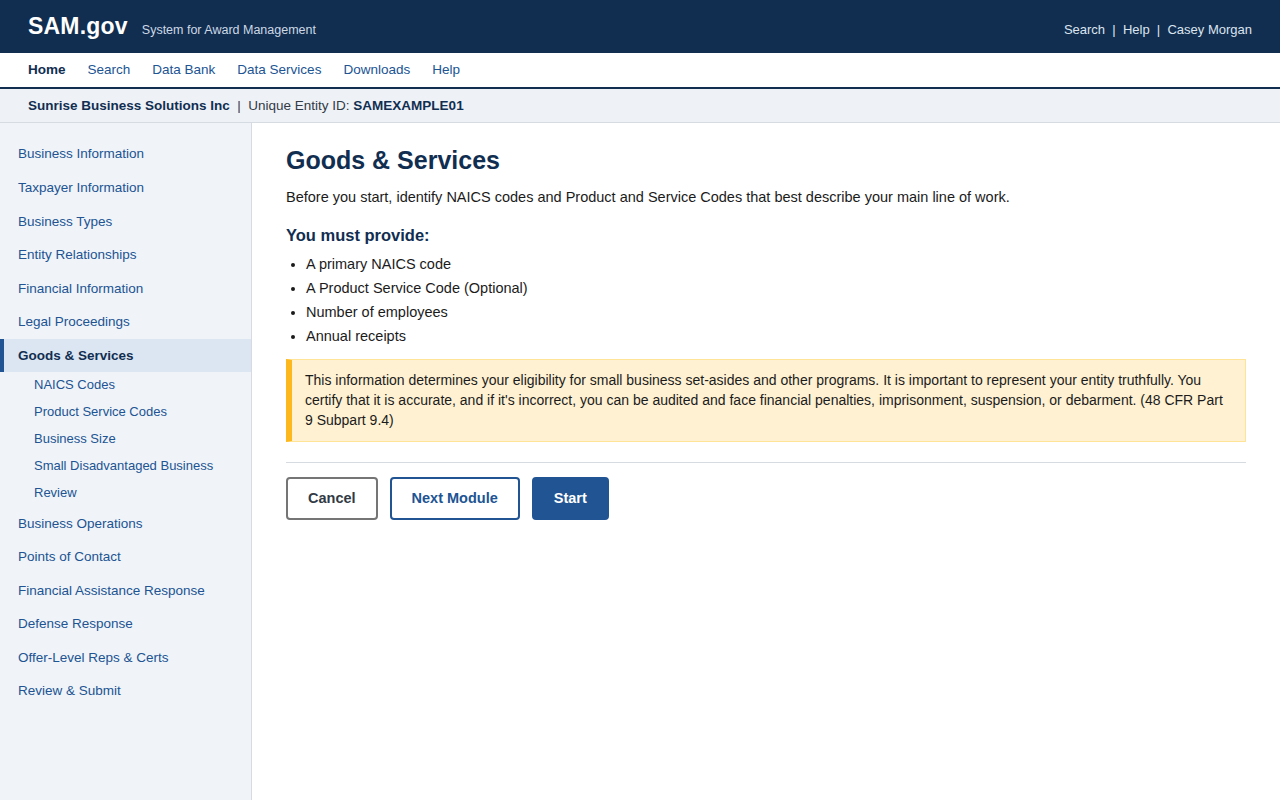
The screen carries a warning worth reading twice. This information determines your eligibility for small business set-asides and other programs. You certify it is accurate, and misrepresenting it can bring audits, financial penalties, imprisonment, suspension, or debarment.
SAM.gov, Goods and Services intro page
The page lists what you must provide: a primary NAICS code, a Product Service Code (optional), number of employees, and annual receipts, with the truthfulness warning and a link to the SBA Size Standards guide.
When you do this step for real, this is the screen waiting for you on the site. Read it over, then use the practice screen below to learn the step by doing it safely first.
Practice getting ready. Check the four things this section requires once you can name them.
Check each thing you must provide
A quick check on this one screen. Answer every question correctly to mark this screen complete. You can move on with Next at any time, finished or not, but the screen only counts as complete once its practice and this check are both done. You can try again if you miss one.
What four things must you provide in this section?
What does the warning on this screen say can happen if you represent your entity untruthfully?
Before the real section, have your final NAICS and PSC lists from your homework ready. What you enter here becomes your certified record and drives your size lane and opportunity matches for the year.
Screen 58: NAICS Codes
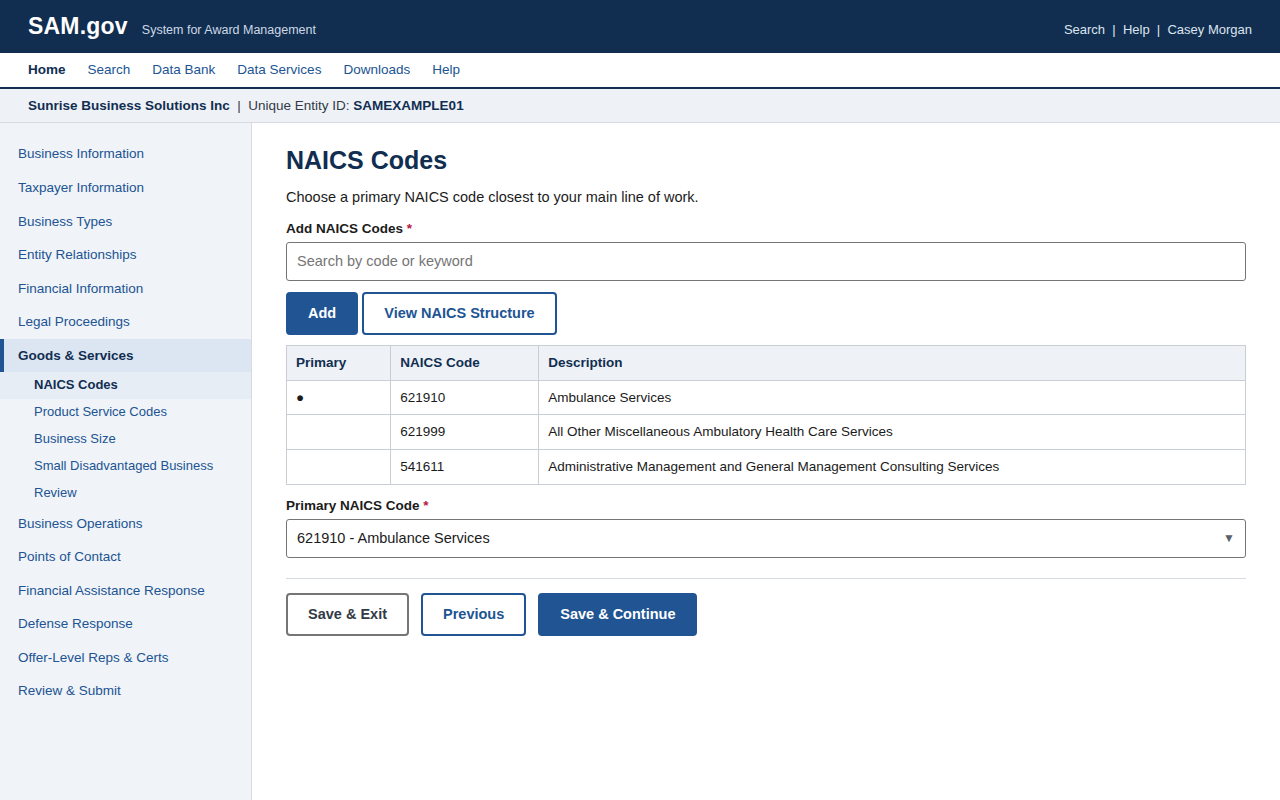
This screen builds your NAICS list. You search for codes, add them, and then mark one as primary: the code closest to your main line of work.
NAICS codes describe what your business does. They drive the size standards you are judged against and which opportunities the system matches to you.
SAM.gov, NAICS Codes page
An Add NAICS Codes search box with an Add button, a View NAICS Structure button, a table of added codes with a Primary column, and a Primary NAICS Code dropdown.
When you do this step for real, this is the screen waiting for you on the site. Read it over, then use the practice screen below to learn the step by doing it safely first.
One click copies a ready-made prompt. Paste it into any AI assistant, and it guides you with two short questions, then gives you your NAICS codes and the PSC codes that go with them.
Here is what happens after you paste the prompt. The assistant will ask you two short questions, one at a time. Answer each one in your own words. Then it will give you your primary NAICS code, three adjacent NAICS codes, and the PSC codes for each one. Bring all of them back here: the NAICS codes go on this screen, and the PSC codes go on the next screen. If a code's description does not match work you really do, do not use it.
Practice for Sunrise. Pick Sunrise's primary code, and add only codes for work Sunrise can perform. The trap codes are work Sunrise cannot do.
Pick one: Sunrise's primary NAICS code (closest to its main line of work)
Check any additional codes Sunrise can truly perform
A quick check on this one screen. Answer every question correctly to mark this screen complete. You can move on with Next at any time, finished or not, but the screen only counts as complete once its practice and this check are both done. You can try again if you miss one.
How do you add a NAICS code, and how do you mark which one is primary?
Why pick only codes for work you can perform?
On the real screen, search for and add only the NAICS codes for work you actually perform, then mark the code for your main line of work as primary. Your PSCs come on the very next screen, so treat the two as one paired step.
Screen 59: Product Service Codes (Optional)
Product Service Codes, PSCs, identify the products and services the government buys. This screen is where you add yours.
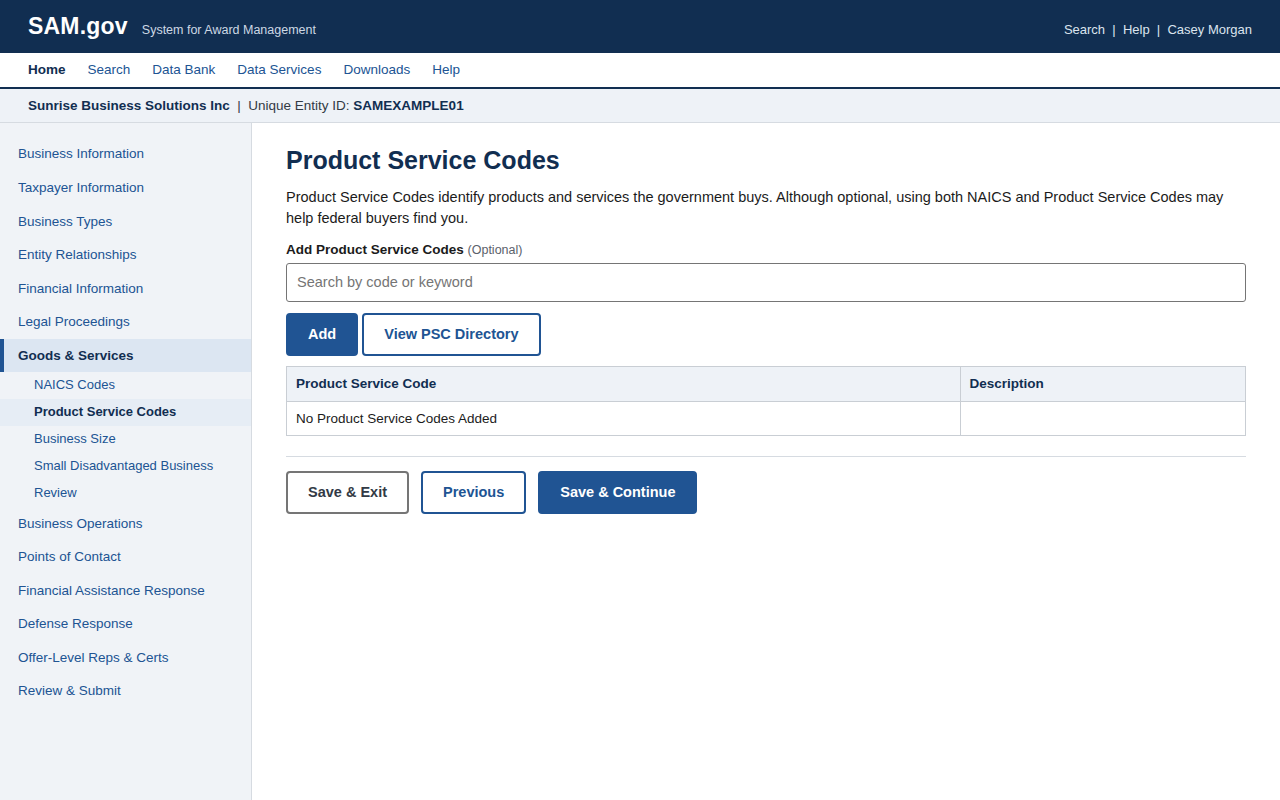
PSCs are optional. The screen tells you why to add them anyway: using both NAICS and Product Service Codes may help federal buyers find you.
SAM.gov, Product Service Codes page
An Add Product Service Codes search box with an Add button, a View PSC Directory button, and a table of added codes. In the walkthrough, the table stays empty: no PSCs added.
When you do this step for real, this is the screen waiting for you on the site. Read it over, then use the practice screen below to learn the step by doing it safely first.
Practice for Sunrise, using the practice PSC list. Sunrise sells ambulance services. Pick the PSC that matches what Sunrise sells, or leave every box unchecked: PSCs are optional, and adding none is a complete answer on the real screen.
Check the PSC that matches Sunrise's service
A quick check on this one screen. Answer every question correctly to mark this screen complete. You can move on with Next at any time, finished or not, but the screen only counts as complete once its practice and this check are both done. You can try again if you miss one.
What is the difference between a NAICS code and a Product Service Code?
PSCs are optional. Why add them anyway?
On the real screen, search the PSC directory by what the government buys, starting with the service you sell, and add the codes that match your real offerings. The official PSC lookup is the PSC Manual at acquisition.gov.
Screen 60: Business Size
This screen takes your size in two numbers: your worldwide number of employees and your worldwide annual receipts.
SAM.gov checks these figures against the Small Business Administration size standards for your NAICS codes. The page cites the SBA rules for counting employees and receipts.
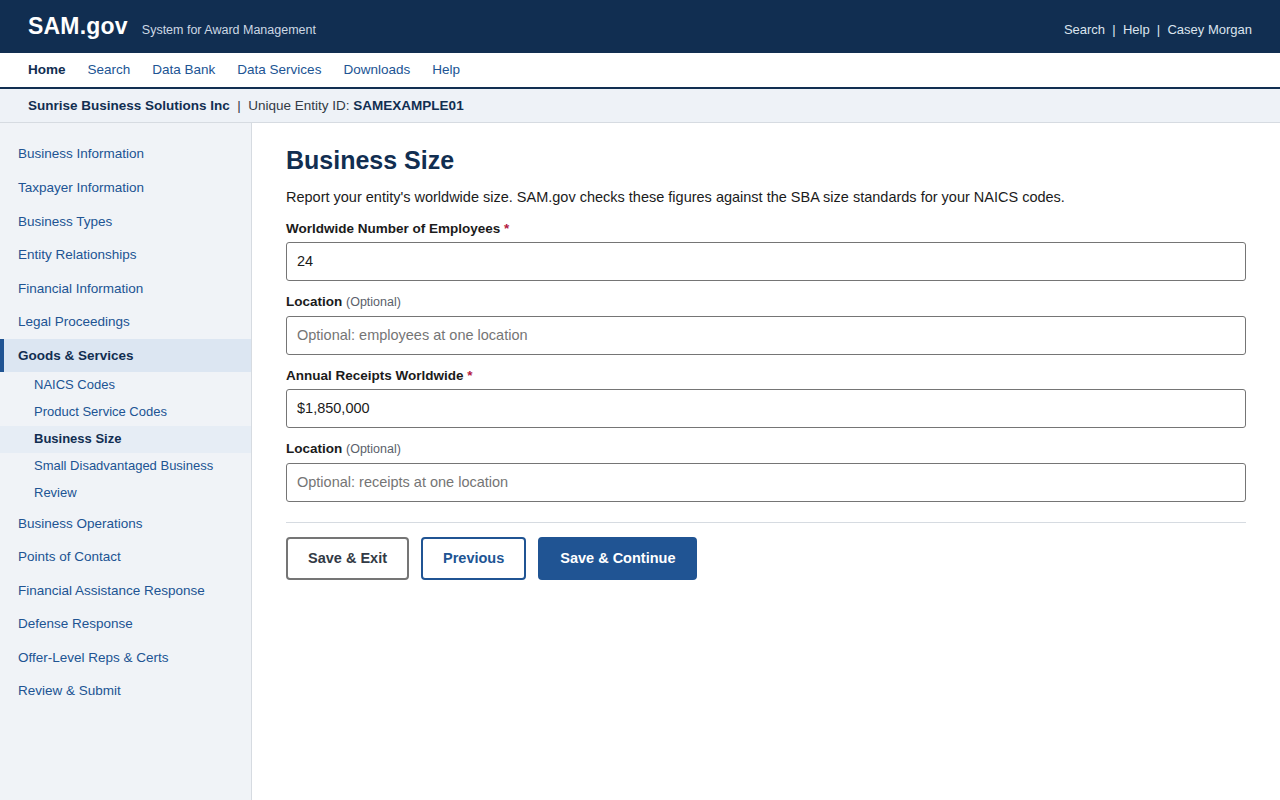
SAM.gov, Business Size page
Worldwide Number of Employees and Annual Receipts Worldwide fields, each with an optional per-location field.
When you do this step for real, this is the screen waiting for you on the site. Read it over, then use the practice screen below to learn the step by doing it safely first.
Practice for Sunrise. From the practice facts: Sunrise has 24 employees worldwide and 1,850,000 dollars in annual receipts worldwide. Enter both numbers.
A quick check on this one screen. Answer every question correctly to mark this screen complete. You can move on with Next at any time, finished or not, but the screen only counts as complete once its practice and this check are both done. You can try again if you miss one.
Worldwide totals or just one location: which figures does this screen want?
On the real screen, enter your worldwide totals: every employee and every dollar of receipts across the whole entity, from the same records your taxes and payroll support.
Screen 61: Small Disadvantaged Business
This screen asks you to self-certify Small Disadvantaged Business status, called SDB, code by code for your NAICS list.
The page shows each NAICS code with its size standard and whether your business is small under it, then states the regulatory definition before the yes or no question.
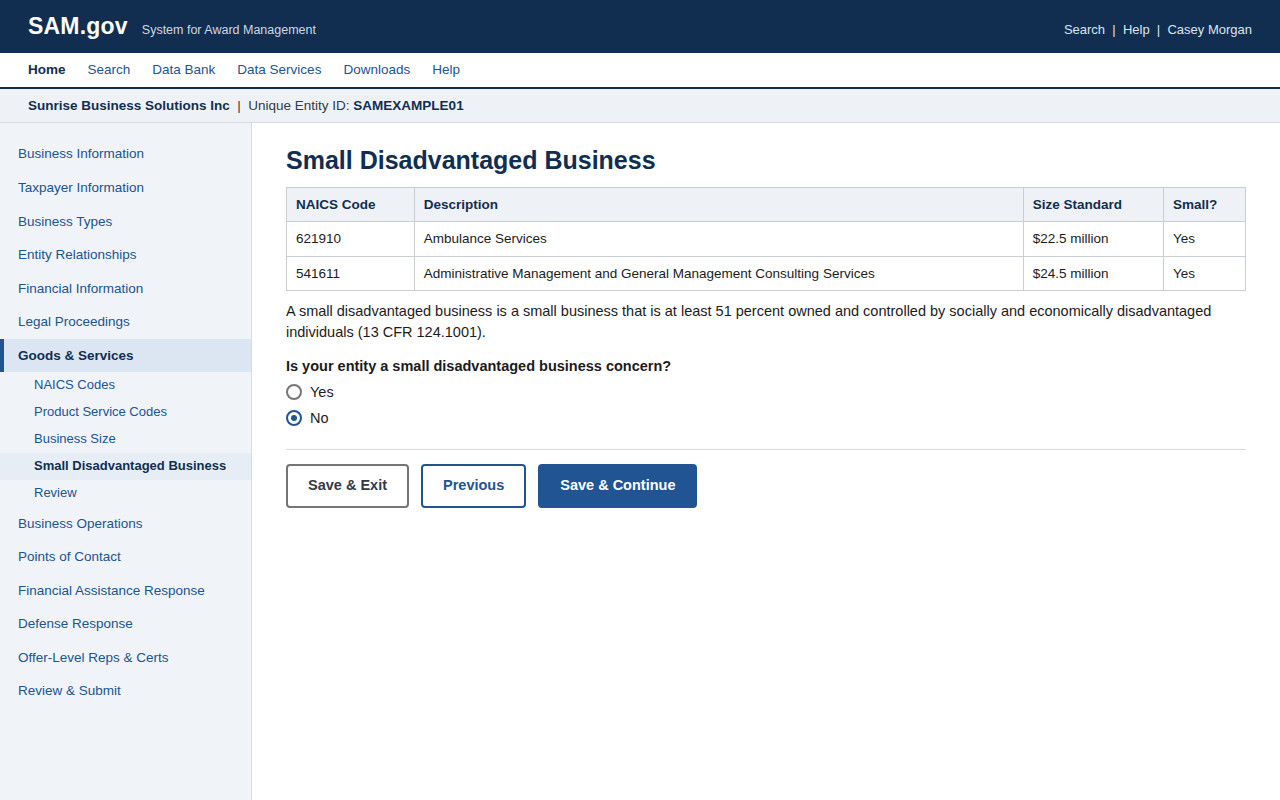
SAM.gov, Small Disadvantaged Business page
A table of NAICS codes with size standards, the SDB definition text citing 13 CFR 124.1001, and a Yes or No self-certification question.
When you do this step for real, this is the screen waiting for you on the site. Read it over, then use the practice screen below to learn the step by doing it safely first.
“Is your entity a small disadvantaged business concern? (yes or no)”
The words above are the form text you will see, quoted from: Federal Service Desk (FSD) Entity Registration Checklist, Representations and Certifications, FAR (Federal Acquisition Regulation) Response 3, item 17. The screen's definition cites the Code of Federal Regulations (CFR) at 13 CFR 124.1001. The teaching in this lesson is written in our own words.Practice for Sunrise. Practice fact: Sunrise is small under its NAICS codes, but it is not owned and controlled by socially and economically disadvantaged individuals. Answer for Sunrise.
Pick one: Is your entity a small disadvantaged business concern?
A quick check on this one screen. Answer every question correctly to mark this screen complete. You can move on with Next at any time, finished or not, but the screen only counts as complete once its practice and this check are both done. You can try again if you miss one.
What does small disadvantaged business mean in the regulation's own terms?
On the real screen, self-certify SDB status code by code only if your entity meets the test for that code: at least 51 percent owned and controlled by socially and economically disadvantaged individuals, and small under that code's size standard.
Screen 62: Goods and Services: Review
This review shows the whole section together: NAICS Codes, Product Service Codes, Business Size, and Small Disadvantaged Business, each row with an Edit link.
The walkthrough behind this lesson models exactly what to do here: before continuing, the registrant uses the Edit links to go back into the NAICS and PSC screens and double-check them.
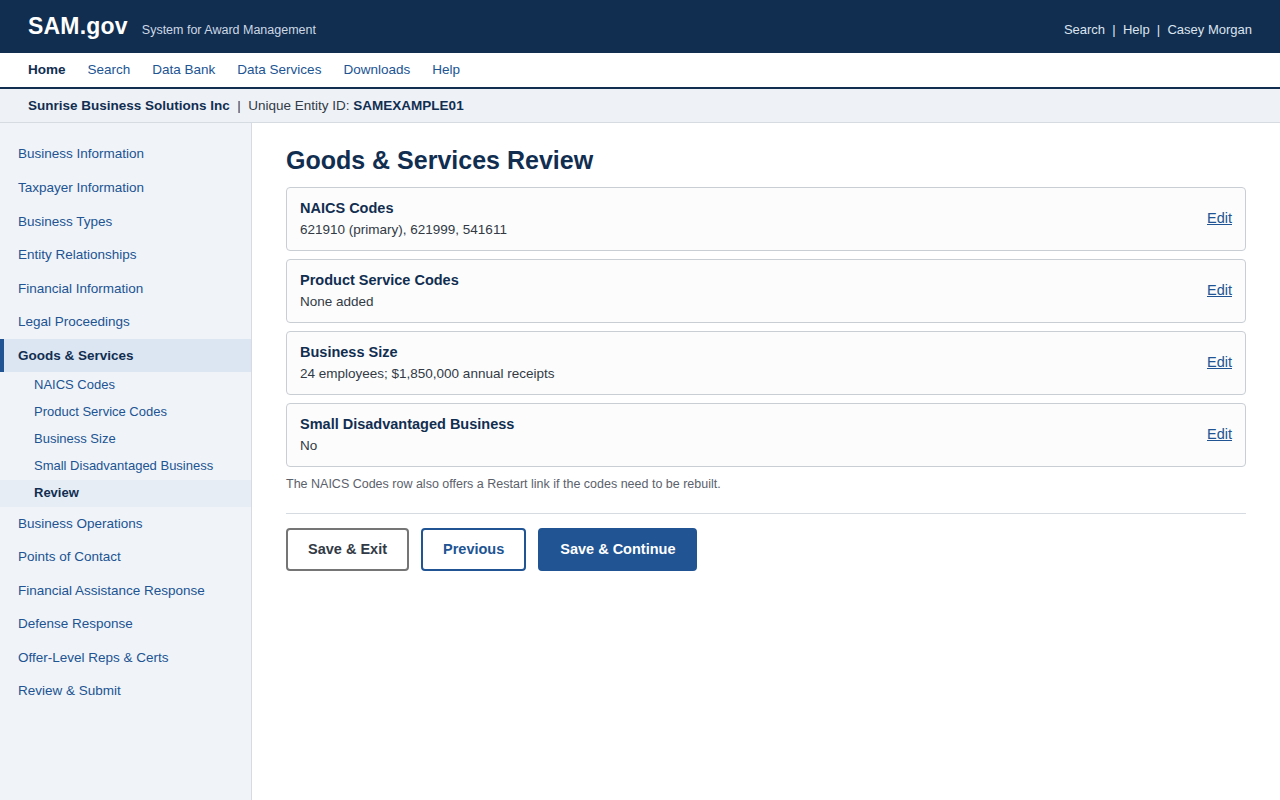
SAM.gov, Goods and Services Review page
One row per sub-step with Edit; the NAICS row also offers Restart.
When you do this step for real, this is the screen waiting for you on the site. Read it over, then use the practice screen below to learn the step by doing it safely first.
Practice the model behavior. Check each row to confirm you reviewed it, including the edit-back check of NAICS and PSCs.
Check each row after reviewing it
A quick check on this one screen. Answer every question correctly to mark this screen complete. You can move on with Next at any time, finished or not, but the screen only counts as complete once its practice and this check are both done. You can try again if you miss one.
What does the walkthrough model doing on this Review screen before continuing?
On the real review, spend the extra minute on the code rows. Wrong NAICS or PSC codes quietly set the wrong size lane and the wrong opportunity matches for a full year.
Module complete Module Complete
Congratulations. You worked through every screen in this module, practiced each one with the example company, and passed the check on each screen.
Here is what you covered:
- Screen 57: Goods and Services: Section intro
- Screen 58: NAICS Codes
- Screen 59: Product Service Codes (Optional)
- Screen 60: Business Size
- Screen 61: Small Disadvantaged Business
- Screen 62: Goods and Services: Review
Your codes and size are recorded, the facts buyers and set-asides run on. Next, Business Operations: security levels, EDI (Electronic Data Interchange), and the Disaster Response Registry.
Pulse Academy | GovCon Mastery Tool. This lesson teaches the registration path. SAM.gov, Login.gov, and the Federal Service Desk are official government services; Pulse Academy is not part of any government agency, and no agency endorses this training.