Back to all modules Definitions: common terms, defined Search the tool
Pulse Academy | GovCon Mastery Tool
SAM Registration: Choosing Your Registration Path
SAM screens 12 to 18 of 92. One screen at a time: see it, learn it, practice it, then answer the screen check to mark the screen complete. Back and Next always work, so you can move in any order.
Screen 12: Welcome: Start a New Entity
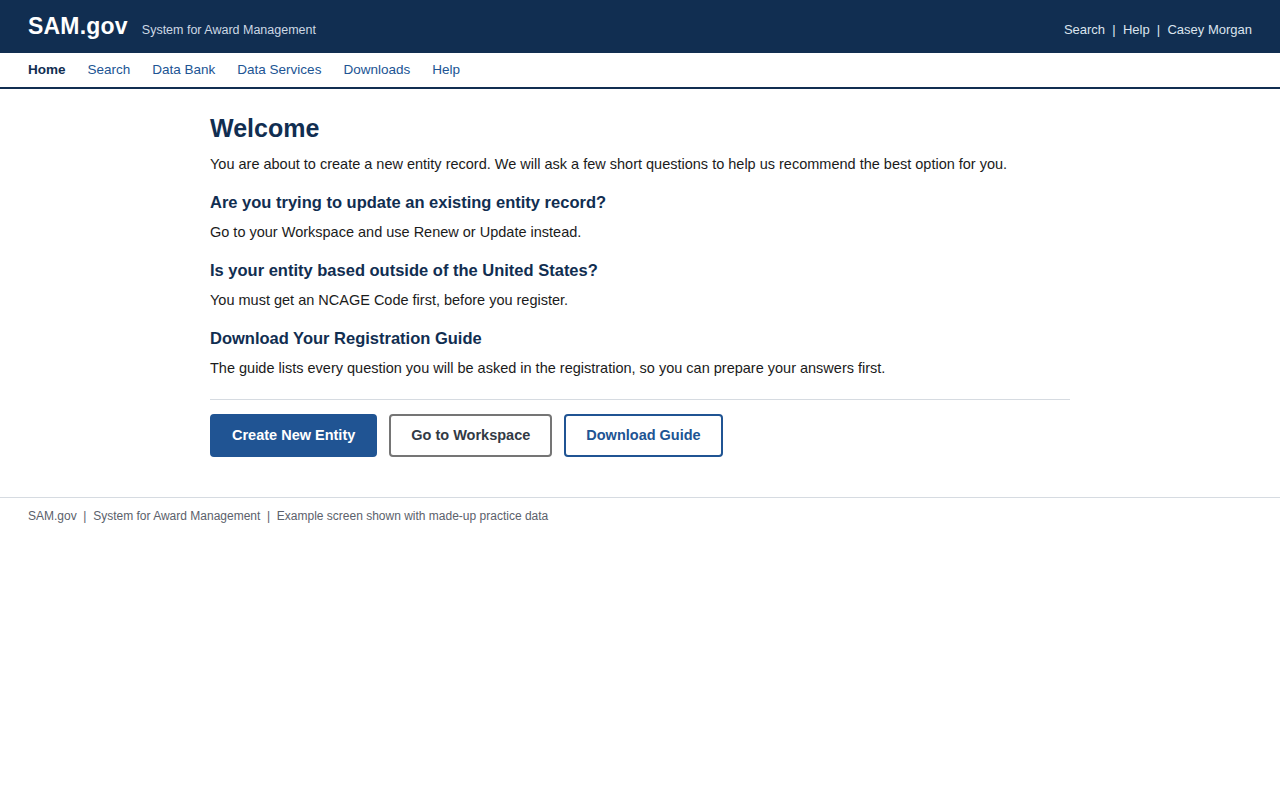
Choosing Add New Entity opens this welcome screen. SAM.gov, the System for Award Management, tells you it will ask a few short questions to recommend the best registration option for you.
The side blocks matter. One sends you to the Workspace if you only need to update an existing entity. One warns that an entity based outside the United States must get an NCAGE code first: NCAGE is the NATO Commercial and Government Entity code, the version of the CAGE code for entities outside the United States. One offers the downloadable Registration Guide.
SAM.gov, Welcome page
The page says you are about to create a new entity record, shows the Create New Entity button, and carries the side blocks about updating an existing entity, entities outside the United States, and the Registration Guide download.
When you do this step for real, this is the screen waiting for you on the site. Read it over, then use the practice screen below to learn the step by doing it safely first.
Practice the first move. The scenario: you are creating a brand new entity record. Pick the button that starts the questions.
A quick check on this one screen. Answer every question correctly to mark this screen complete. You can move on with Next at any time, finished or not, but the screen only counts as complete once its practice and this check are both done. You can try again if you miss one.
What does the downloadable Registration Guide contain?
If you are only trying to update an existing entity, where does this screen send you?
On the real site, download the Registration Guide when it is offered and keep it open beside you. If your entity is based outside the United States, get your NCAGE code before going any further.
Screen 13: What Is Your Goal?
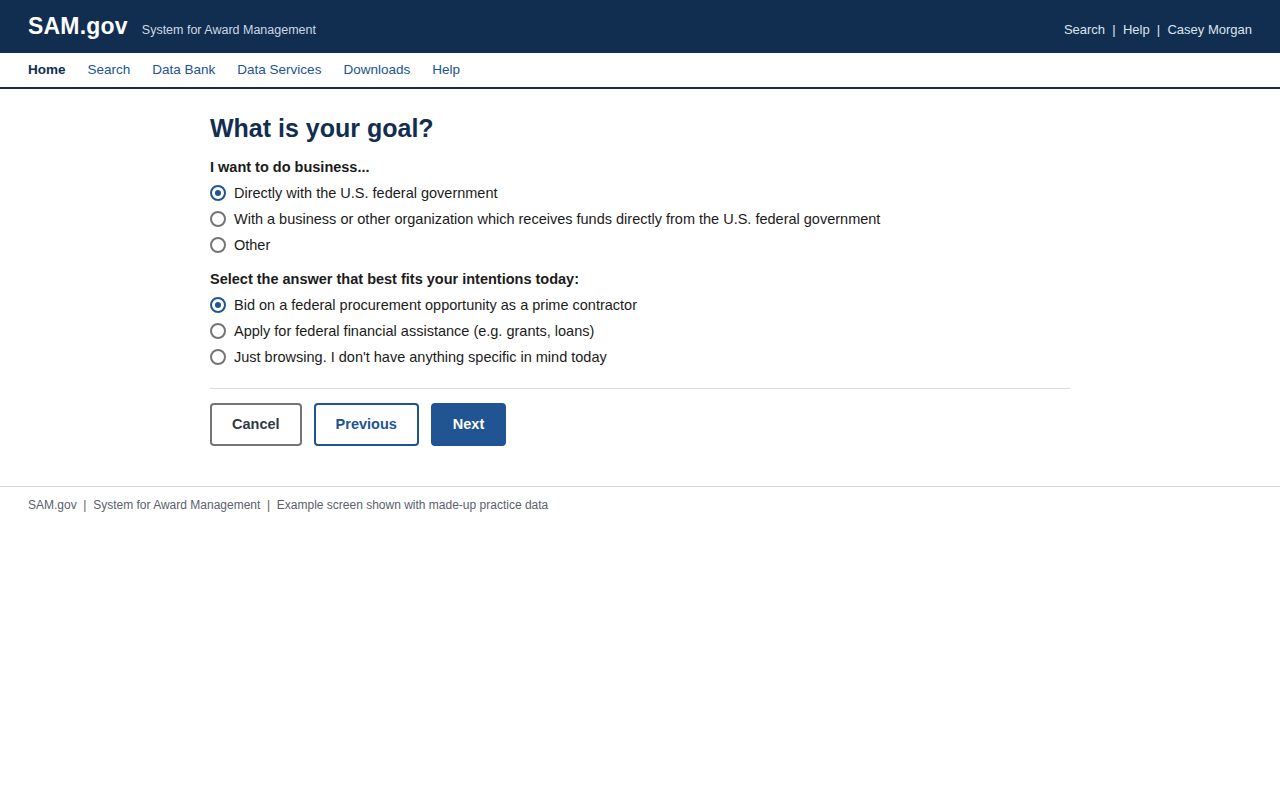
The first recommendation question asks what you want to do. First, who you want to do business with. Then, the answer that best fits your intentions today.
Your answers steer the recommendation on the next screens. The official guidance is clear that this questionnaire is a suggestion tool. There is no single right or wrong answer, and if the recommendation does not fit, you can choose a different option.
SAM.gov, What is your goal page
The page asks I want to do business, with choices including Directly with the U.S. federal government, then asks you to select the answer that best fits your intentions today, including Bid on a federal procurement opportunity as a prime contractor.
When you do this step for real, this is the screen waiting for you on the site. Read it over, then use the practice screen below to learn the step by doing it safely first.
Practice for Sunrise. Sunrise wants to bid on federal contracts as a prime contractor. Answer both questions the way Sunrise would.
Example company card: Sunrise Business Solutions Inc (all made up)
| Legal business name | Sunrise Business Solutions Inc |
| What it does | Ambulance services |
| Physical address | 4120 Meridian Crossing, Suite 210, Indianapolis, IN 46204 |
| Start date | March 14, 2019 (date of incorporation, Indiana) |
| Fiscal year end | December 31 |
| Owner and president | Casey Morgan |
Pick one: I want to do business
Pick one: the answer that best fits your intentions today
A quick check on this one screen. Answer every question correctly to mark this screen complete. You can move on with Next at any time, finished or not, but the screen only counts as complete once its practice and this check are both done. You can try again if you miss one.
Which goal answers lead SAM.gov to recommend All Awards?
If the recommendation does not fit your needs, can you choose a different option?
On the real question, a business that wants federal contracts answers: do business directly with the U.S. federal government, and bid on a federal procurement opportunity as a prime contractor.
Screen 14: Who Sent You to SAM.gov?
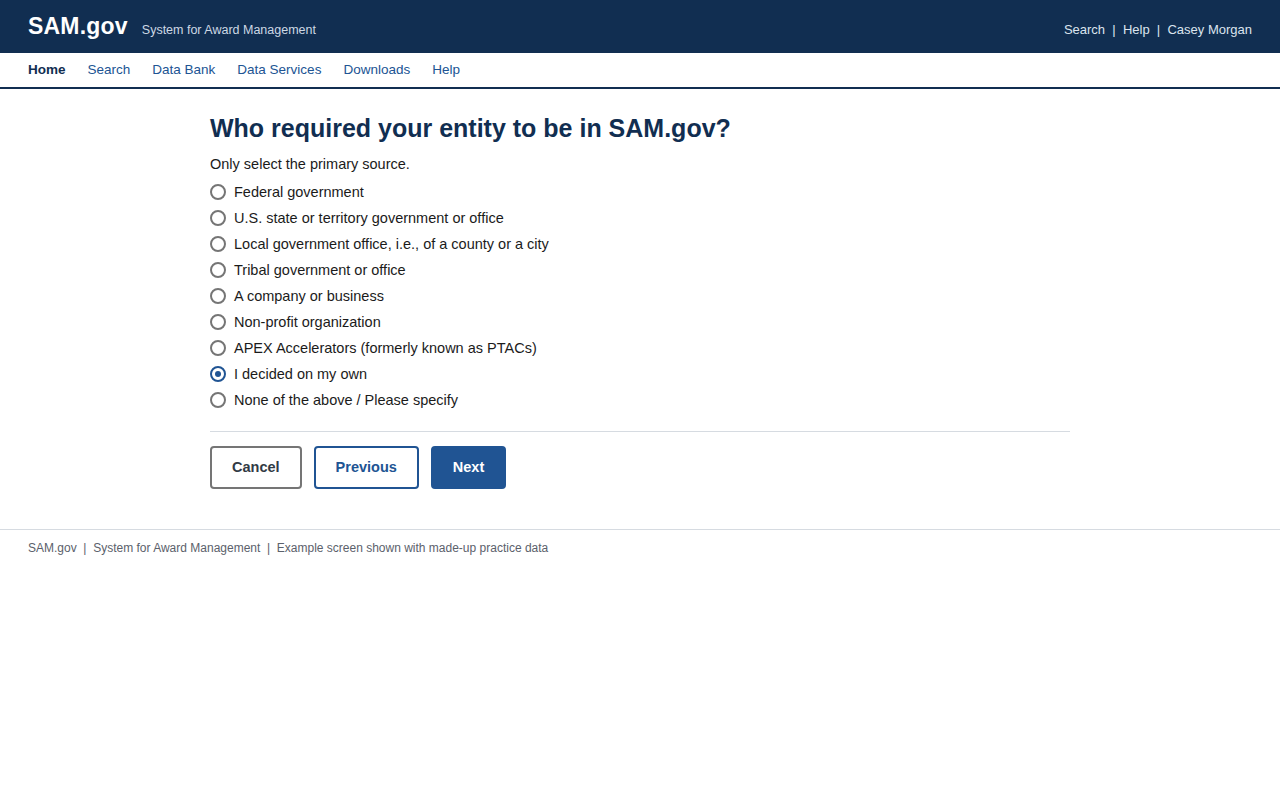
This question records who sent you to SAM.gov. The screen gives a long list of possible sources, from the federal government down to I decided on my own.
Read the instruction on the screen carefully: only select the primary source. One answer, even if several feel true.
SAM.gov, Who required your entity to be in SAM.gov page
A radio list of sources: federal government, state or local government, tribal government, a company or business, non-profit organization, APEX Accelerators, I decided on my own, and more.
When you do this step for real, this is the screen waiting for you on the site. Read it over, then use the practice screen below to learn the step by doing it safely first.
Practice for Sunrise. The scenario: Casey Morgan, the owner, decided on his own to register Sunrise. Pick the one primary source.
Pick one only: who required your entity to be in SAM.gov?
A quick check on this one screen. Answer every question correctly to mark this screen complete. You can move on with Next at any time, finished or not, but the screen only counts as complete once its practice and this check are both done. You can try again if you miss one.
How many sources do you select on this screen, even if more than one applies?
On the real list, pick the one source most responsible for your being in SAM.gov. If nobody sent you, I decided on my own is an honest answer.
Screen 15: Choose Your Registration Option
This is the recommendation result. The page compares three options side by side: Unique Entity ID Only, Financial Assistance, and All Awards, and marks one as recommended based on your answers.
Read the comparison rows. Every option includes entity validation and a Unique Entity ID. Only All Awards lets you bid on federal contracts as a prime contractor.
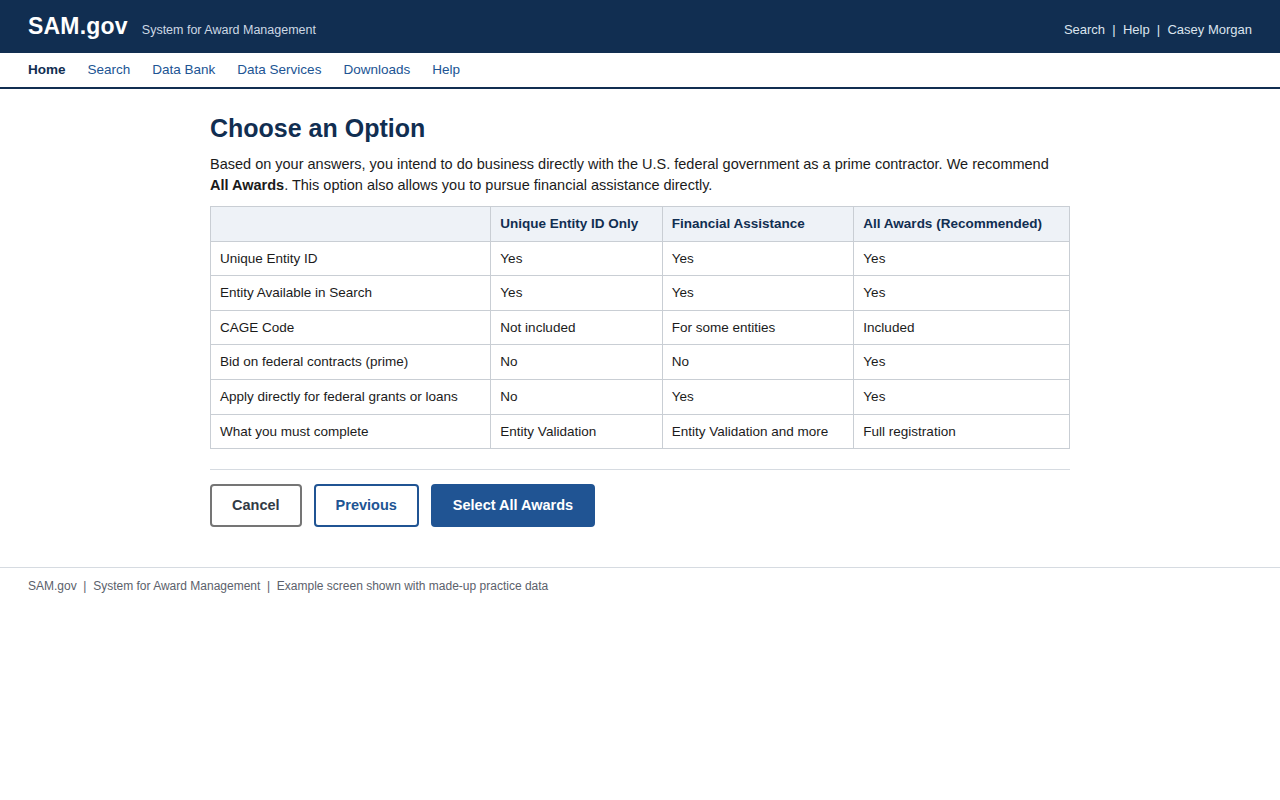
SAM.gov, Choose an Option page
A comparison table with three columns. The All Awards column is marked Recommended. Rows compare what you get, when you need it, and what you must complete.
When you do this step for real, this is the screen waiting for you on the site. Read it over, then use the practice screen below to learn the step by doing it safely first.
Practice the choice for Sunrise, which wants to bid on federal contracts. Pick the option Sunrise must select.
A quick check on this one screen. Answer every question correctly to mark this screen complete. You can move on with Next at any time, finished or not, but the screen only counts as complete once its practice and this check are both done. You can try again if you miss one.
Which option is the only one that lets you bid on federal contracts as a prime contractor?
What does every option include?
On the real walk-through, this is the moment to slow down. Confirm the recommended option matches your real goal before you select it. Changing paths later means starting the registration over.
Screen 16: Are You Registering a Government Entity?
This yes or no question decides your entity type. It asks whether the entity you are registering is a government entity.
A follow-up asks about being physically located in the United States.
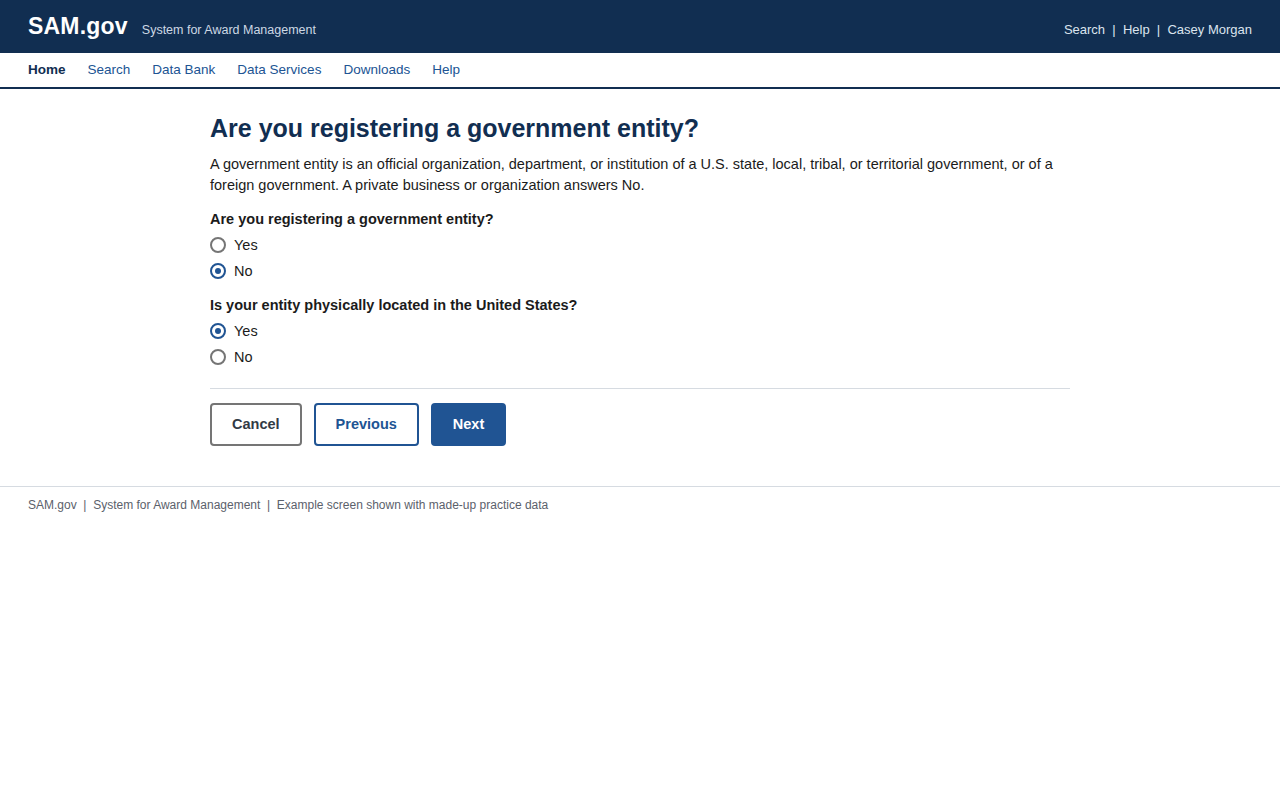
SAM.gov, government entity question page
The page asks the government entity question with Yes and No choices, and follow-up choices about physical location in the United States.
When you do this step for real, this is the screen waiting for you on the site. Read it over, then use the practice screen below to learn the step by doing it safely first.
“Are you registering a government entity?”
The words above are the form text you will see, quoted from: Federal Service Desk (FSD) KB0038643 and the FSD Quick Start Guide: Contract Registrations (KB0012064). The teaching in this lesson is written in our own words.Practice for Sunrise. Sunrise Business Solutions Inc is a private ambulance company. Answer the question the way Sunrise must.
Pick one: Are you registering a government entity?
A quick check on this one screen. Answer every question correctly to mark this screen complete. You can move on with Next at any time, finished or not, but the screen only counts as complete once its practice and this check are both done. You can try again if you miss one.
Your company is a private business. Do you answer Yes or No here, and why?
On the real question, answer Yes only for an official government organization. A private business answers No, for profit or non-profit alike.
Screen 17: Do You Already Have a CAGE Code?
This question asks whether your entity already has a CAGE code. CAGE stands for Commercial and Government Entity. It is a code that identifies your entity in defense and federal systems.
The choices are simple: yes, and I can provide it, or no.
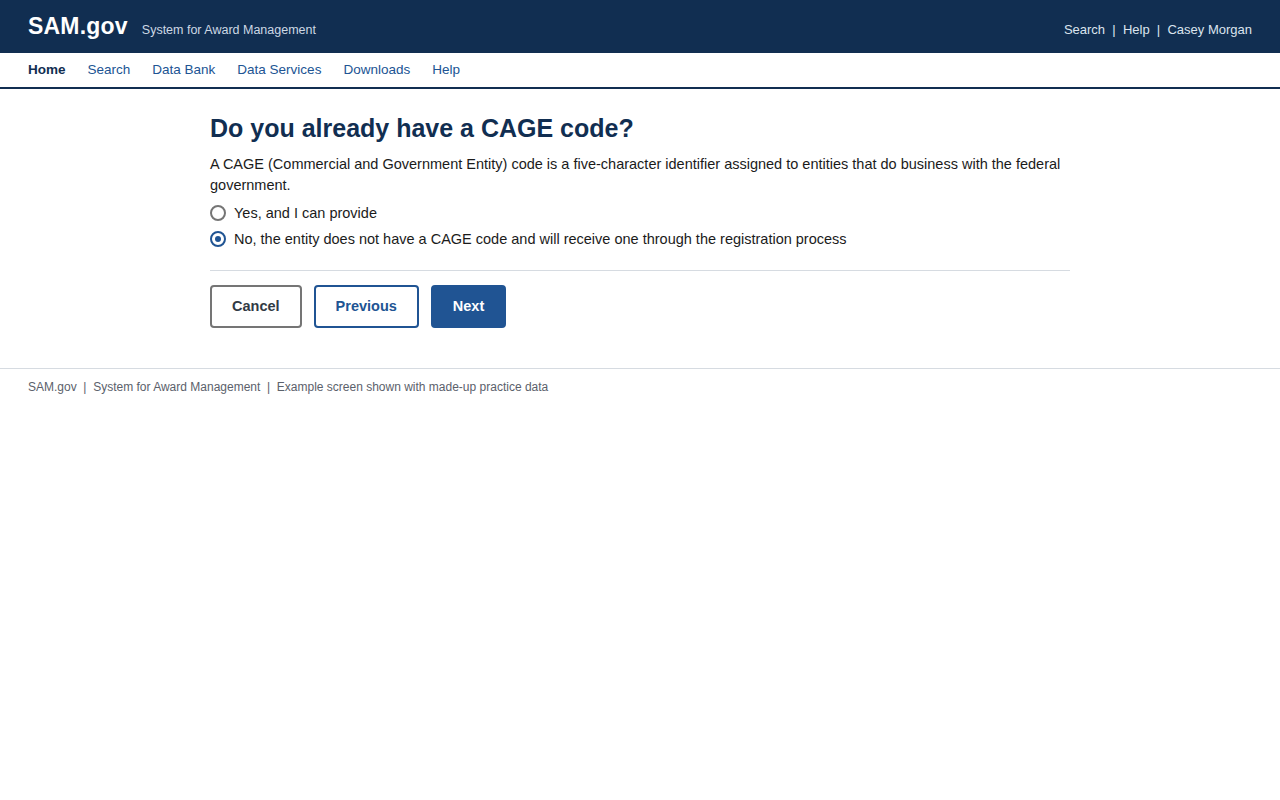
SAM.gov, CAGE code question page
The page explains the CAGE code and offers two radio choices: Yes, and I can provide, or No.
When you do this step for real, this is the screen waiting for you on the site. Read it over, then use the practice screen below to learn the step by doing it safely first.
“Do you already have a CAGE code?” Answer options: “Yes, and I can provide” / “No, the entity does not have a CAGE code and will receive one through the registration process.”
The words above are the form text you will see, quoted from: FSD Quick Start Guide: Contract Registrations (KB0012064). The teaching in this lesson is written in our own words.Practice for Sunrise. Sunrise is a new U.S. company registering for the first time and has never been given a CAGE code. Answer for Sunrise.
Pick one: Do you already have a CAGE code?
A quick check on this one screen. Answer every question correctly to mark this screen complete. You can move on with Next at any time, finished or not, but the screen only counts as complete once its practice and this check are both done. You can try again if you miss one.
What is a CAGE code, and do you have to have one before you start?
On the real question, a brand new U.S. business answers No. Your CAGE code is assigned after you submit. Never type in a code that belongs to another company.
Screen 18: Your Registration Path: Check the Summary
Before the real form opens, SAM.gov shows you a summary of the path you chose: your entity type and your purpose of registration.
This is a checkpoint, not a formality. If anything on this summary is wrong, going back now is cheap. Going back later can mean starting over.
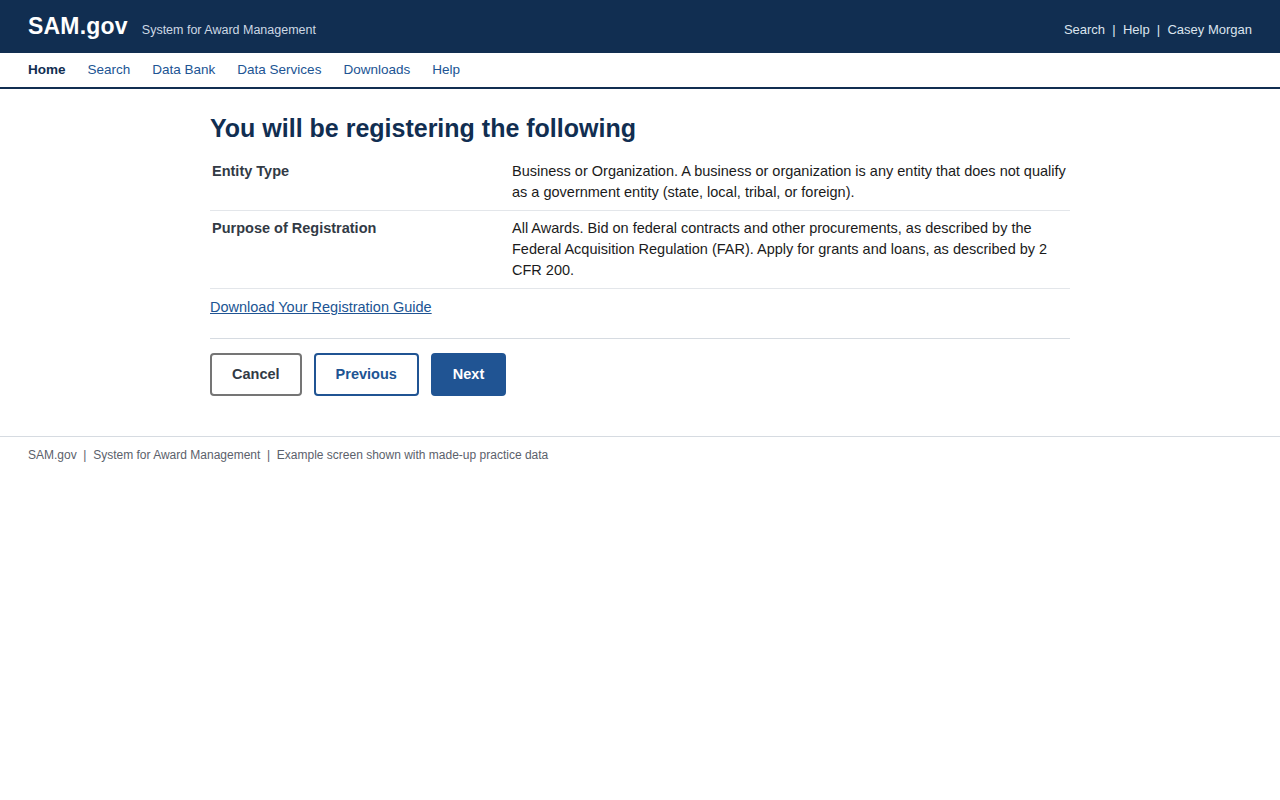
SAM.gov, registration summary page
The page shows Entity Type: Business or Organization, and Purpose of Registration: All Awards, with the Registration Guide download and Cancel, Previous, and Next buttons.
When you do this step for real, this is the screen waiting for you on the site. Read it over, then use the practice screen below to learn the step by doing it safely first.
Practice the checkpoint. Read the summary on the practice card, then check both boxes to confirm the two facts match Sunrise.
Practice summary (matches Sunrise)
| Entity Type | Business or Organization |
| Purpose of Registration | All Awards |
Check each fact after you verify it
A quick check on this one screen. Answer every question correctly to mark this screen complete. You can move on with Next at any time, finished or not, but the screen only counts as complete once its practice and this check are both done. You can try again if you miss one.
Before you select Next, what two facts on this summary must match your company?
On the real summary, stop and read two lines before continuing: entity type and purpose of registration. If either is wrong, go back with Previous and fix the answers that produced it.
Module complete Module Complete
Congratulations. You worked through every screen in this module, practiced each one with the example company, and passed the check on each screen.
Here is what you covered:
- Screen 12: Welcome: Start a New Entity
- Screen 13: What Is Your Goal?
- Screen 14: Who Sent You to SAM.gov?
- Screen 15: Choose Your Registration Option
- Screen 16: Are You Registering a Government Entity?
- Screen 17: Do You Already Have a CAGE Code?
- Screen 18: Your Registration Path: Check the Summary
You know how the opening questions recommend a path, and why All Awards is the path for bidding on federal contracts. Next, the form itself opens with Business Information.
Pulse Academy | GovCon Mastery Tool. This lesson teaches the registration path. SAM.gov, Login.gov, and the Federal Service Desk are official government services; Pulse Academy is not part of any government agency, and no agency endorses this training.