Back to all modules Definitions: common terms, defined Search the tool

Pulse Academy | GovCon Mastery Tool
SAM Registration: Taxpayer Information
SAM screens 28 to 33 of 92. One screen at a time: see it, learn it, practice it, then answer the screen check to mark the screen complete. Back and Next always work, so you can move in any order.
Screen 28: Taxpayer Information: Section intro
This section hands your taxpayer information to the Internal Revenue Service for verification. The IRS checks that your taxpayer number, name, and address agree with its records.
The screen tells you verification typically takes up to two business days, and it tells you to check your IRS or tax records before you start.
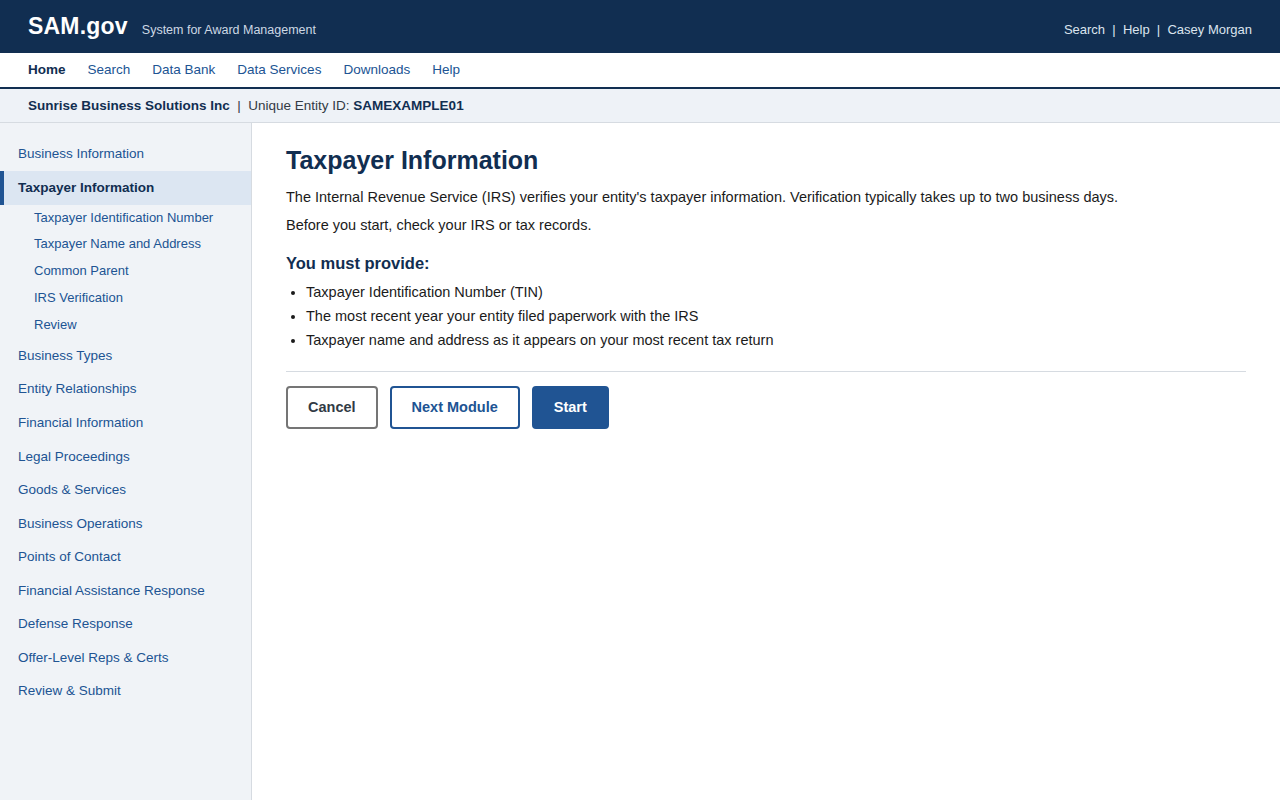
SAM.gov, Taxpayer Information intro page
The page says the IRS verifies your entity's taxpayer information and lists what you must provide: Taxpayer Identification Number, the most recent filing year, and the taxpayer name and address from your most recent tax return.
When you do this step for real, this is the screen waiting for you on the site. Read it over, then use the practice screen below to learn the step by doing it safely first.
Practice getting ready. Check the three things this section requires, and leave the distractor unchecked.
Check each thing you must provide
A quick check on this one screen. Answer every question correctly to mark this screen complete. You can move on with Next at any time, finished or not, but the screen only counts as complete once its practice and this check are both done. You can try again if you miss one.
What does the IRS verify in this section, and how long does the screen say verification typically takes?
What three things must you provide in this section?
Before the real section, get out your most recent tax return and your EIN letter. This whole section is copied from IRS records, and a mismatch waits on the IRS cycle.
Screen 29: Taxpayer Identification Number (TIN)
This screen takes your entity's Taxpayer Identification Number, and the most recent year your entity filed with the IRS.
SAM.gov, the System for Award Management, is clear about why: the number is verified against IRS records, and a TIN is required to register.
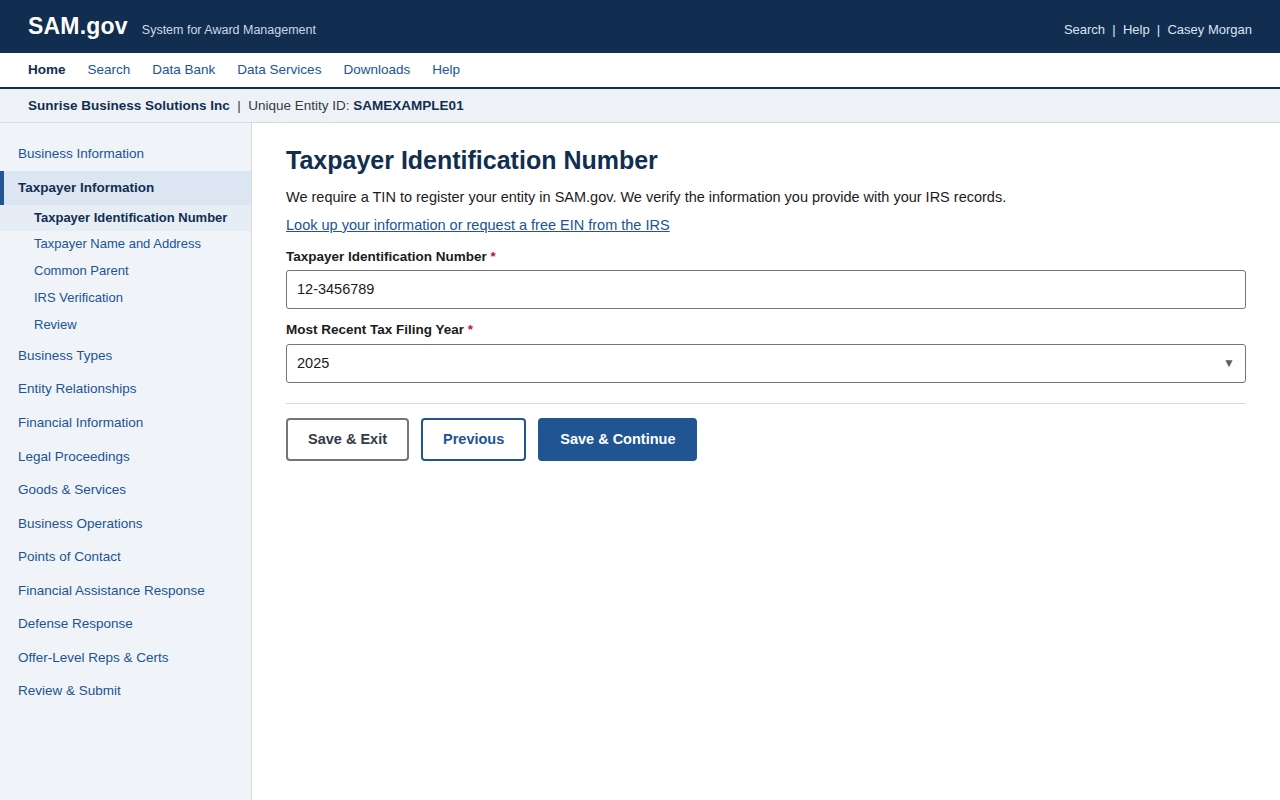
SAM.gov, Taxpayer Identification Number page
The page explains the TIN requirement, links to IRS information for looking up your number or requesting a free EIN, and provides the entry fields.
When you do this step for real, this is the screen waiting for you on the site. Read it over, then use the practice screen below to learn the step by doing it safely first.
Practice only, with a made up number. Read the practice EIN letter, then type the number and the filing year exactly as shown. Never type a real TIN into any practice screen.
Practice EIN letter (entirely made up)
| Taxpayer | Sunrise Business Solutions Inc |
| Employer Identification Number | 35-2741098 |
| Most recent filing year | 2025 |
A quick check on this one screen. Answer every question correctly to mark this screen complete. You can move on with Next at any time, finished or not, but the screen only counts as complete once its practice and this check are both done. You can try again if you miss one.
For a company, which number goes here, and where do you look it up if you are not sure it is right?
On the real screen, type your EIN exactly as it appears on your IRS letter, plus the most recent year your entity filed. If you are unsure of the number, stop and check the letter first.
Screen 30: Taxpayer Name and Address
This screen takes the taxpayer name and address for the entity, the way the IRS has them.
The screen carries a Pro Tip worth memorizing: the Taxpayer Name must exactly match the name the IRS has on file for your entity's TIN, according to its most recent tax return.
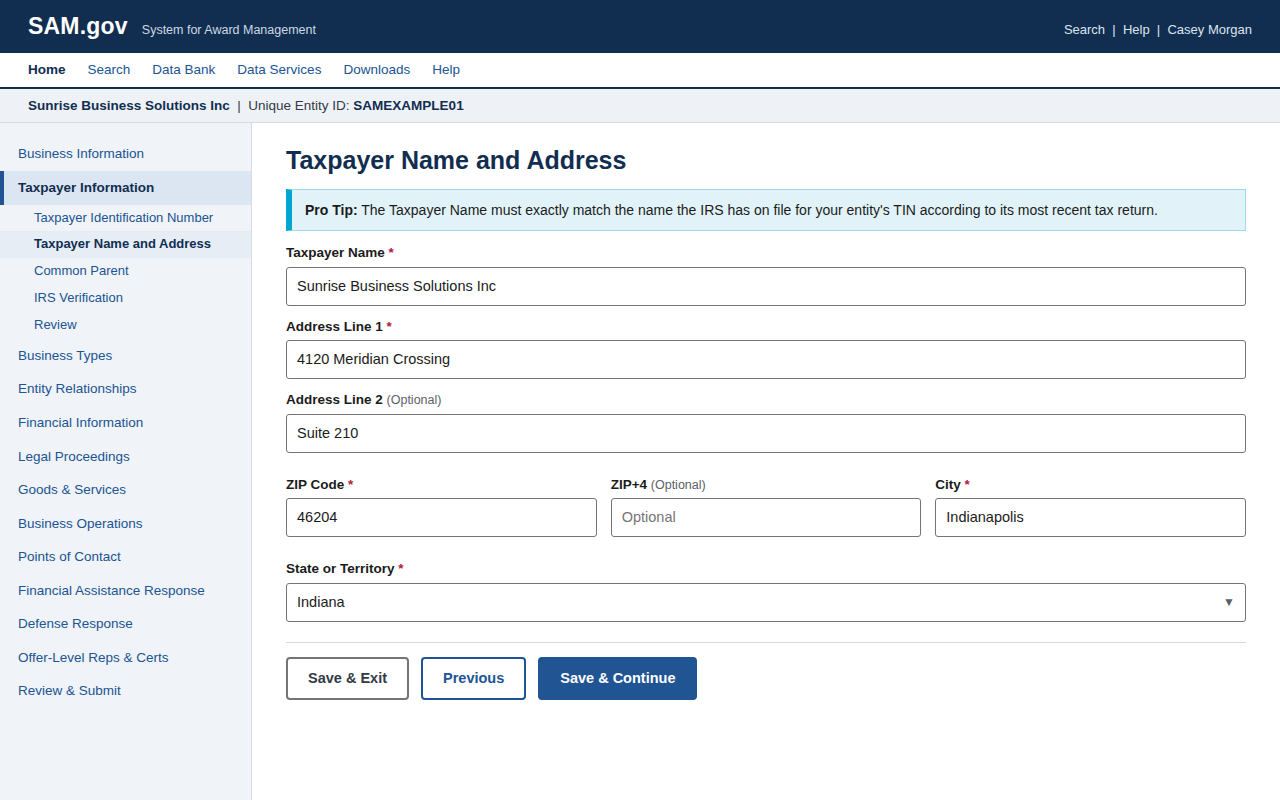
SAM.gov, Taxpayer Name and Address page
A taxpayer name field, address lines, ZIP code, city, and a State or Territory dropdown, with the Pro Tip box about exact matching.
When you do this step for real, this is the screen waiting for you on the site. Read it over, then use the practice screen below to learn the step by doing it safely first.
Practice for Sunrise. The practice tax return card shows the taxpayer name the IRS has on file. Enter the name and address exactly as the return shows them.
Practice: from Sunrise's most recent tax return (made up)
| Taxpayer Name | Sunrise Business Solutions Inc |
| Address | 4120 Meridian Crossing, Suite 210, Indianapolis, IN 46204 |
A quick check on this one screen. Answer every question correctly to mark this screen complete. You can move on with Next at any time, finished or not, but the screen only counts as complete once its practice and this check are both done. You can try again if you miss one.
Your SAM.gov legal name and your IRS taxpayer name differ slightly. Which one wins on this screen?
On the real screen, copy the taxpayer name and address from your most recent tax return, character for character, even where it differs from the name you used in Business Information.
Screen 31: Common Parent
This screen asks a single yes or no question inside the taxpayer section. It is one of the most misunderstood questions in the whole registration, so this lesson slows down for it.
The question is about a common parent for tax purposes: a parent company that files its federal income tax returns on a consolidated basis, meaning one combined return that covers your company.
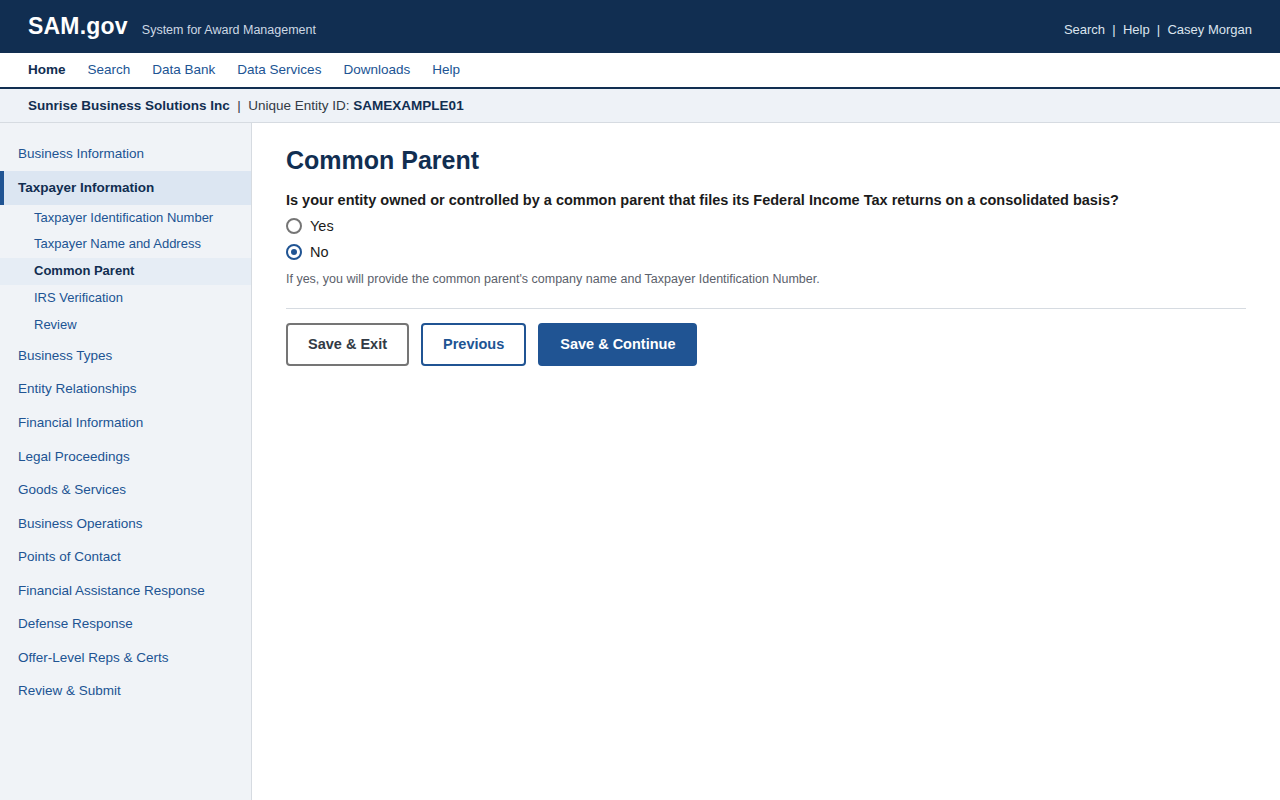
SAM.gov, Common Parent page, inside Taxpayer Information
A single Yes or No question with radio buttons, and Save and Continue buttons.
When you do this step for real, this is the screen waiting for you on the site. Read it over, then use the practice screen below to learn the step by doing it safely first.
“Is your entity owned or controlled by a common parent that files its Federal Income Tax returns on a consolidated basis? (yes or no)” If yes, provide the company name and tax identification number of the common parent.
The words above are the form text you will see, quoted from: Federal Service Desk (FSD) Entity Registration Checklist, Representations and Certifications, FAR (Federal Acquisition Regulation) Response 2, item 6. The Checklist files this question with the Reps and Certs; the live flow places the Common Parent step here in Taxpayer Information. The teaching in this lesson is written in our own words.Practice for Sunrise. Sunrise files its own federal tax return, runs its own bank accounts, and no parent files a consolidated return for it. Answer the question for Sunrise.
Pick one: Is your entity owned or controlled by a common parent that files its Federal Income Tax returns on a consolidated basis?
A quick check on this one screen. Answer every question correctly to mark this screen complete. You can move on with Next at any time, finished or not, but the screen only counts as complete once its practice and this check are both done. You can try again if you miss one.
What is a common parent for tax purposes, and what fact about YOUR company decides this answer?
How is this question different from the Immediate Owner question in Entity Relationships, where a parent company does count?
If the answer were Yes, what two pieces of information must you provide?
On the real question, answer for your own facts: if your company files its own taxes and runs its own finances, the answer is No, even with a parent company above you. Answer Yes only when a common parent files a consolidated return that includes your entity, and be ready with that parent's name and TIN.
Screen 32: IRS Verification: Consent to Disclosure of Tax Information
Before the IRS will verify anything, it needs your consent. This screen presents the Consent to Disclosure of Tax Information.
The consent explains that your IRS validated name and TIN will reside in SAM.gov and be accessible to federal procurement officials and other government personnel for government business, including tax reporting and debt collection.
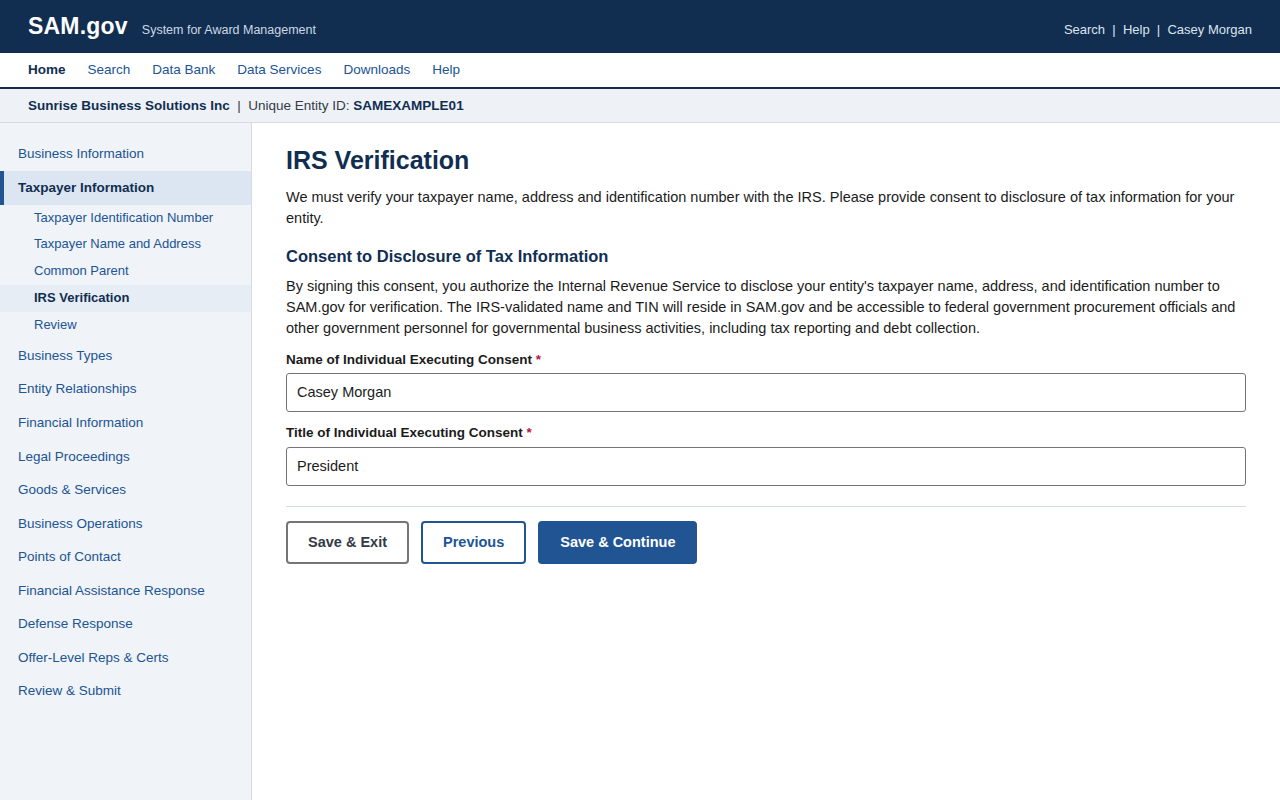
SAM.gov, IRS Verification consent page
The consent legal text, followed by fields for the name and title of the individual executing the consent.
When you do this step for real, this is the screen waiting for you on the site. Read it over, then use the practice screen below to learn the step by doing it safely first.
Practice the signature block for Sunrise. Casey Morgan, Sunrise's president, executes the consent.
A quick check on this one screen. Answer every question correctly to mark this screen complete. You can move on with Next at any time, finished or not, but the screen only counts as complete once its practice and this check are both done. You can try again if you miss one.
What does this consent allow the IRS to disclose, and to whom?
Who may execute the consent?
On the real consent, read what the IRS may disclose and who can see it, then sign it as a person with authority for the entity, usually the owner or an officer.
Screen 33: Taxpayer Information: Review and Submit to IRS
This review screen lists the whole taxpayer section: TIN, taxpayer name and address, Common Parent, and IRS Verification, each row with an Edit link.
When the review is right, the Submit To IRS button sends the section to the IRS. A confirmation follows, and the section is marked submitted.
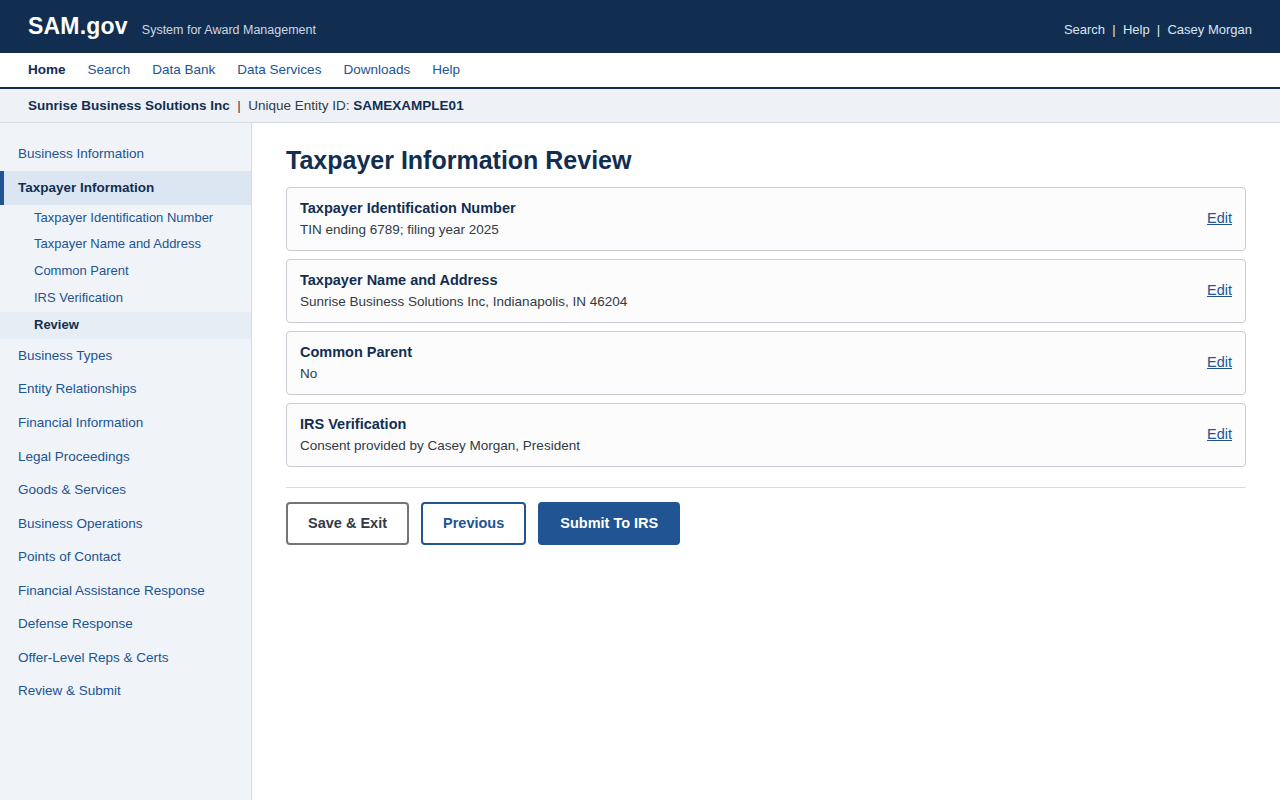
SAM.gov, Taxpayer Information Review page
Review rows for each taxpayer sub-step with Edit links, and a Submit To IRS button.
When you do this step for real, this is the screen waiting for you on the site. Read it over, then use the practice screen below to learn the step by doing it safely first.
Practice the review habit. Check each row as if you had verified it against the tax return, then pick the button that sends the section.
Check each row after reviewing it against the tax return
A quick check on this one screen. Answer every question correctly to mark this screen complete. You can move on with Next at any time, finished or not, but the screen only counts as complete once its practice and this check are both done. You can try again if you miss one.
What happens after you select Submit To IRS, and what would you do if the IRS cannot match your information?
On the real review, check the taxpayer name against the return one last time before submitting to the IRS. Fixing a mismatch after submission waits on the IRS, so the Edit links matter now.
Module complete Module Complete
Congratulations. You worked through every screen in this module, practiced each one with the example company, and passed the check on each screen.
Here is what you covered:
- Screen 28: Taxpayer Information: Section intro
- Screen 29: Taxpayer Identification Number (TIN)
- Screen 30: Taxpayer Name and Address
- Screen 31: Common Parent
- Screen 32: IRS Verification: Consent to Disclosure of Tax Information
- Screen 33: Taxpayer Information: Review and Submit to IRS
Your taxpayer information is on its way to the IRS for verification. Next, Business Types, where your legal formation and socioeconomic categories are recorded.
Pulse Academy | GovCon Mastery Tool. This lesson teaches the registration path. SAM.gov, Login.gov, and the Federal Service Desk are official government services; Pulse Academy is not part of any government agency, and no agency endorses this training.